Colorspace Dataset
Allows you to see the impact of the color space on compression and energy.
Name |
Value |
Description (link) |
Total |
|---|---|---|---|
effort |
|
\(2\) |
|
encoder |
|
\(4\) |
|
host |
|
\(1\) |
|
metrics |
|
||
primaries |
|
vid_gamut (in profile) |
\(3\) |
profile |
|
\(2\) |
|
quality |
\(\left\{\frac{k}{17} \mid k \in [1,16] \right\}\) |
\(16\) |
|
range |
|
vid_range (in profile) |
\(2\) |
repeat |
\(2\) times |
total repetitions |
\(2\) |
transfer |
|
vid_eotf (in profile) |
\(5\) |
video |
|
\(1\) |
|
total |
\(\prod\) |
total number of points |
\(15360\) |
Download
mendevi download colorspace.db.xz.torrent
colorspace.json.xz (845 Ko).
colorspace.db.xz.torrent (577 Mo).
Pipeline
This is the pipeline used for measurements:
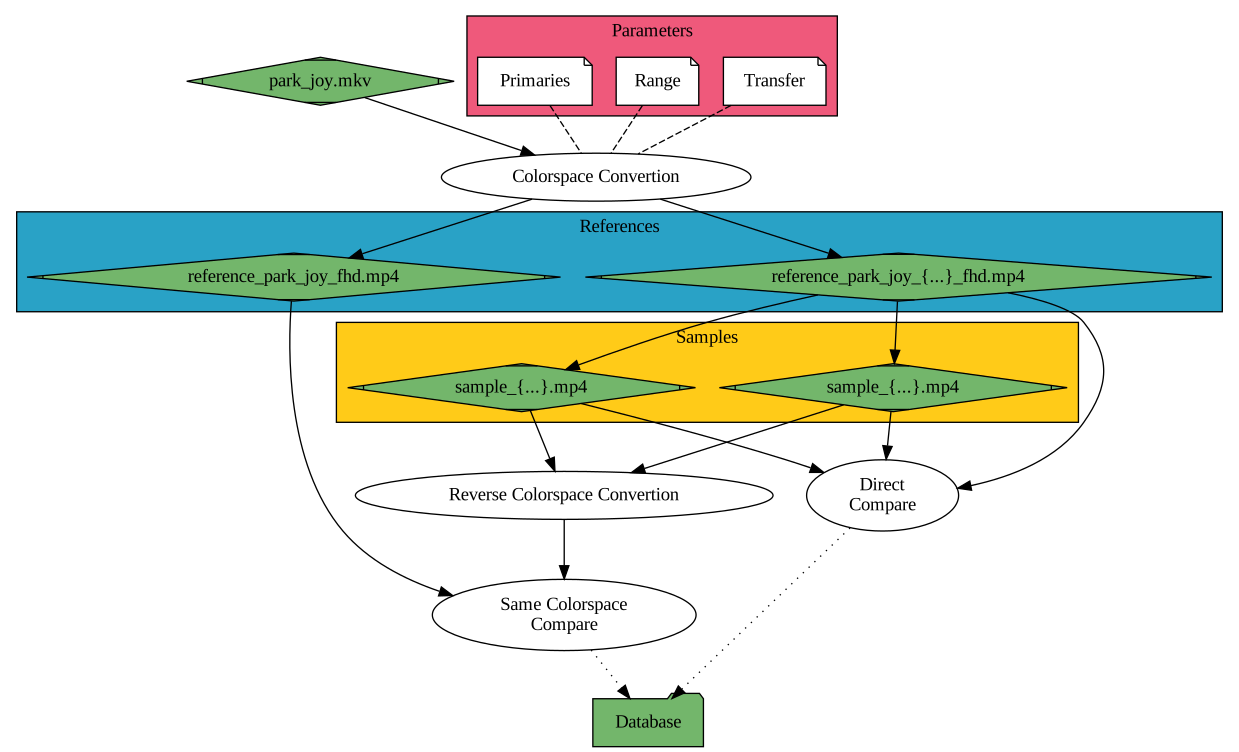
The input video
park_joy.mkvwas losslessly transcoded with different colorspaces to form the set of reference videosreference_park_joy_*_fhd.mp4, including the defaultreference_park_joy_fhd.mp4.Each of the
reference_park_joy_*videos was lossy encoded by varying several parameters but without changing the colorspace. These videos form thesample*collection.
Plots
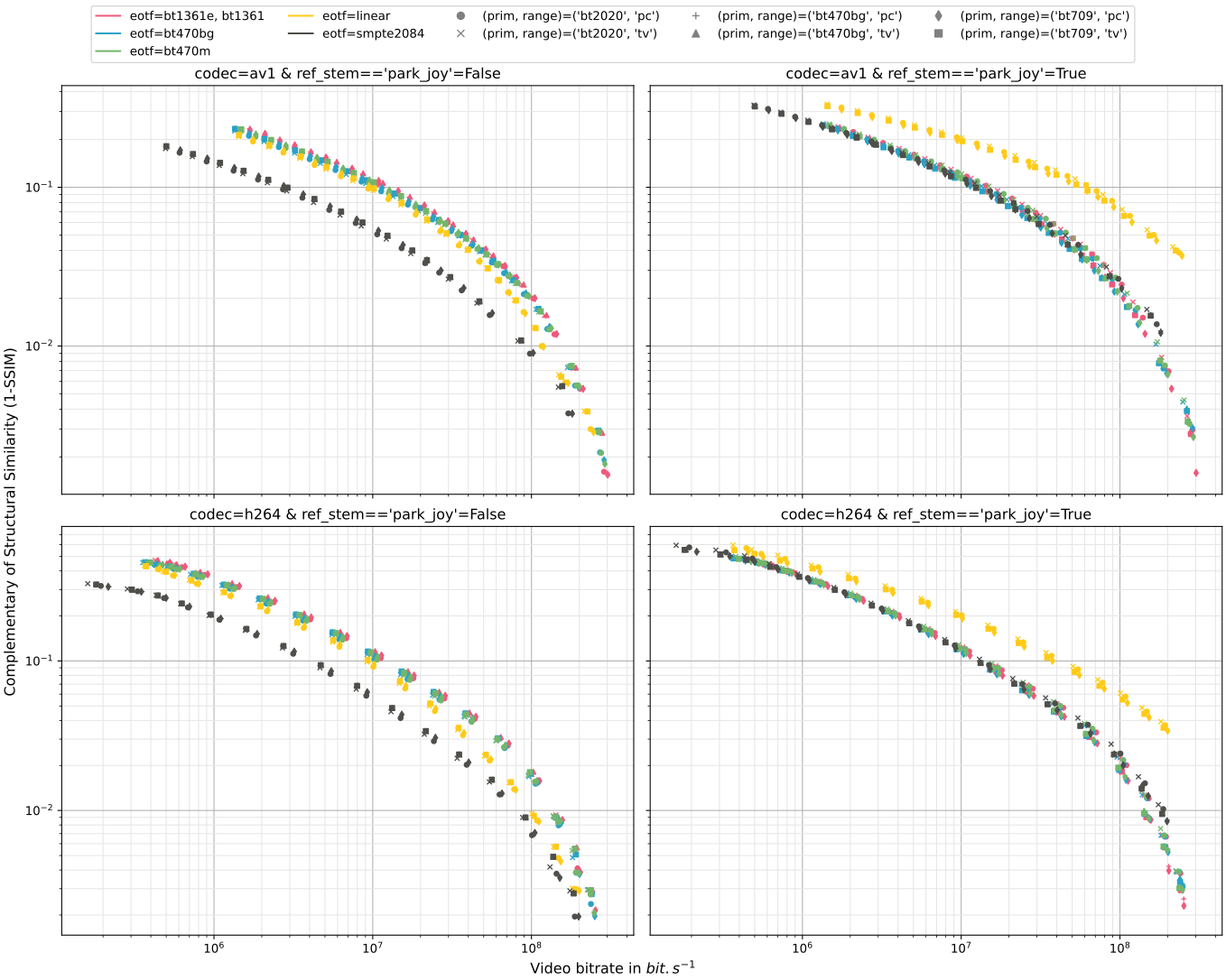
Distortion as a function of bitrate for several colorspaces
On the left column, the sample videos are directly compared (without color conversion) to their lossless reference
reference_park_joy_*_fhd.mp4.On the right column, the sample videos are transformed back using the inverse color transformation and then, compared to the same default reference
reference_park_joy_fhd.mp4.
mendevi plot colorspace.db -x rate -y ssim_comp -c eotf -m '(prim, range)' -wx "ref_stem=='park_joy'" -wy codec -f "not name.startswith('ref')" -t t_met_metric
Impact of EOTF on energy consumption
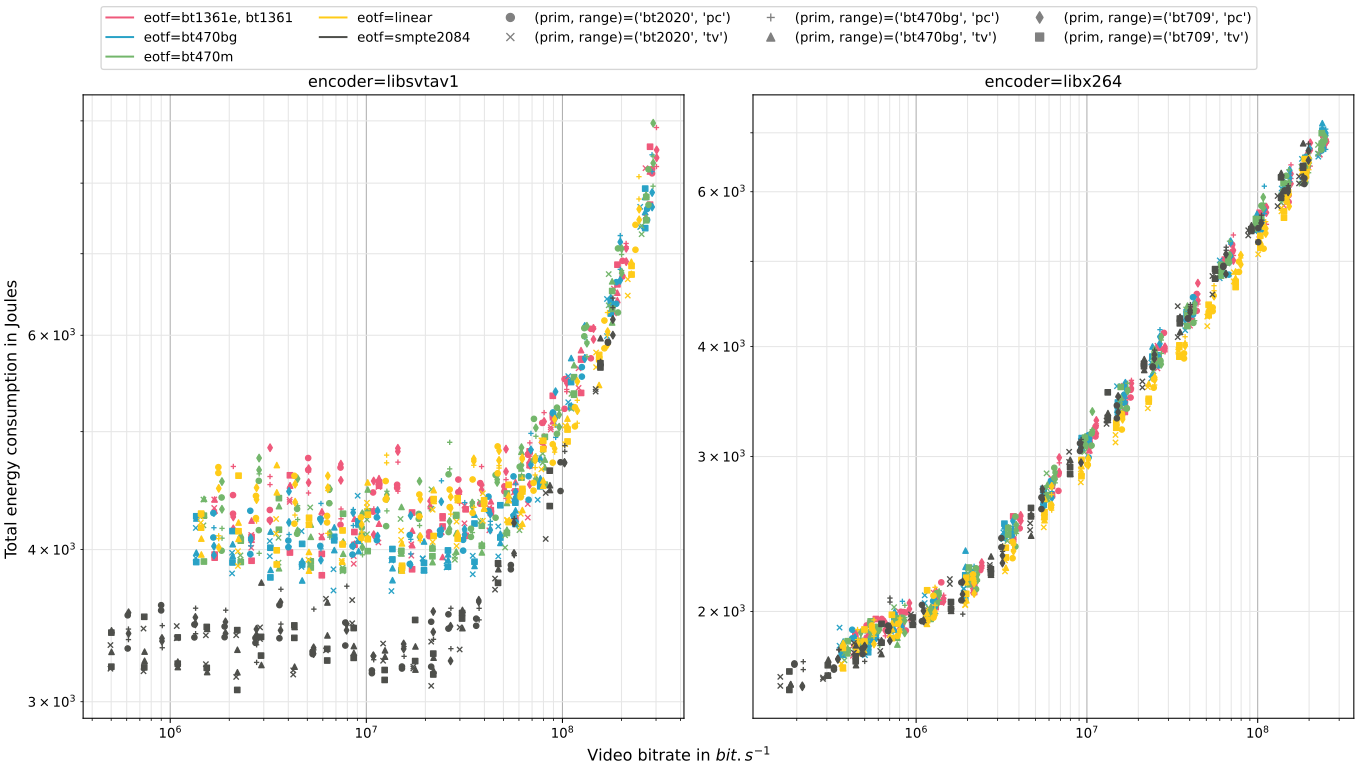
Regardless of the encoder used, the energy does not depend on the primary colors or the range. On the other hand, libsvtav1 curiously consumes about 20% less when using the smpte2084 transfer function!
mendevi plot colorspace.db -x rate -y energy -c eotf -m '(prim, range)' -wx encoder -s 'sharey="row"' 'sharey=False'
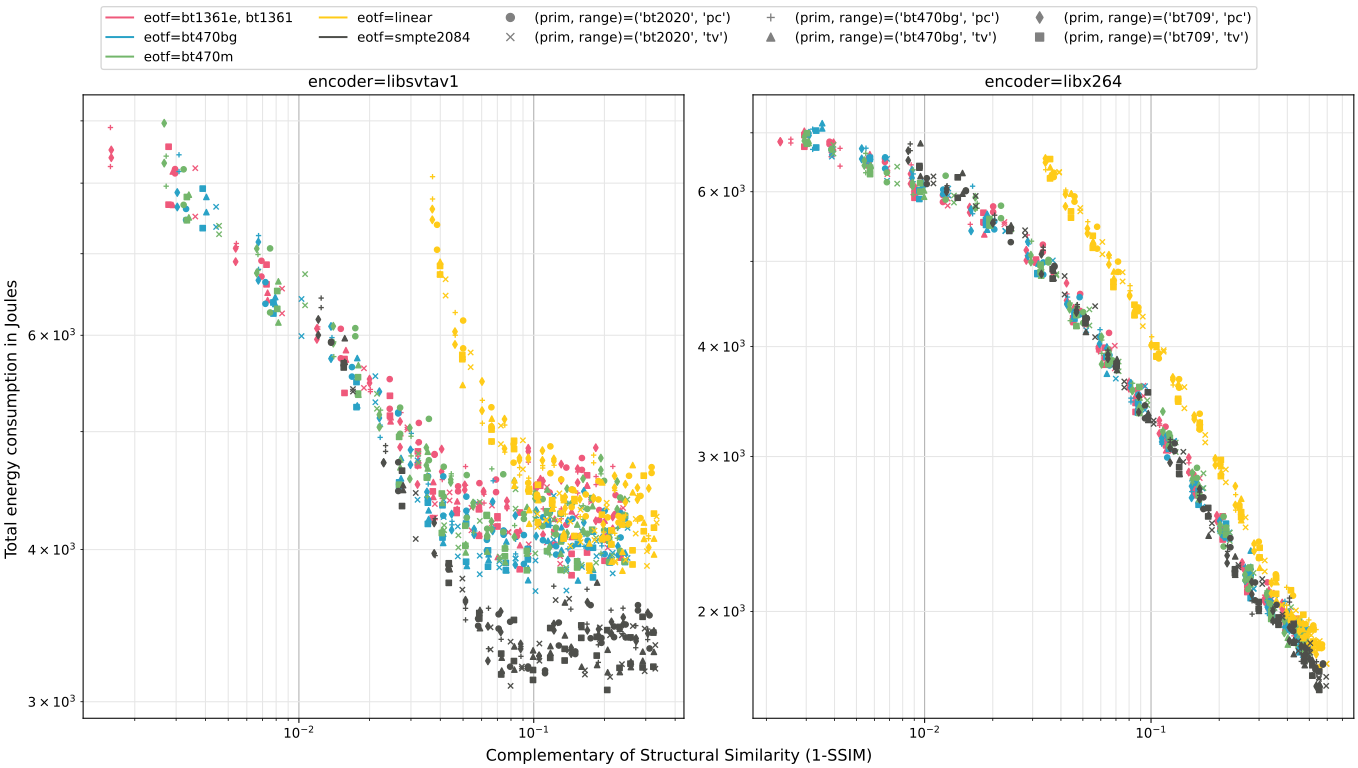
In the graph below, all videos are compared to the same reference video reference_park_joy_fhd.mp4, i.e., in the same absolute color space.
mendevi plot colorspace.db -x ssim_comp -y energy -c eotf -m '(prim, range)' -wx encoder -f "ref_stem=='park_joy'" -s 'sharey="row"' 'sharey=False' -t t_met_metric
Lossless color transformation
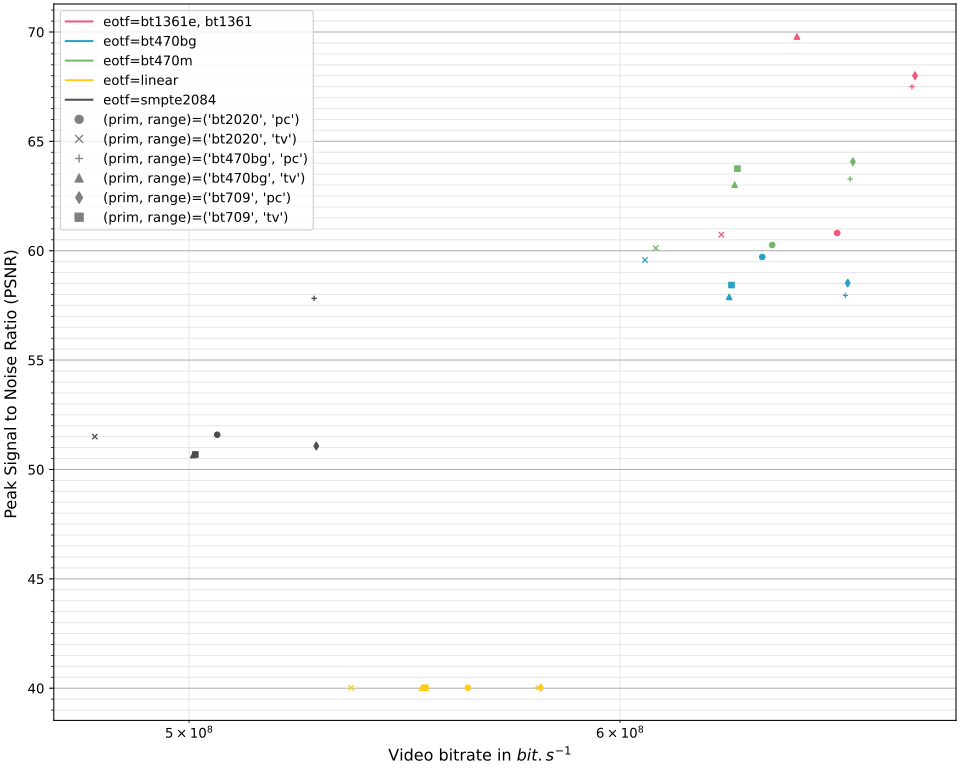
The reference videos park_joy_* are transformed back using the inverse color transformation and then, compared to the same reference park_joy. In view of the PSNR, the conversion can be considered lossless.
mendevi plot colorspace.db -x rate -y psnr -c eotf -m '(prim, range)' -f "'reference' in name"
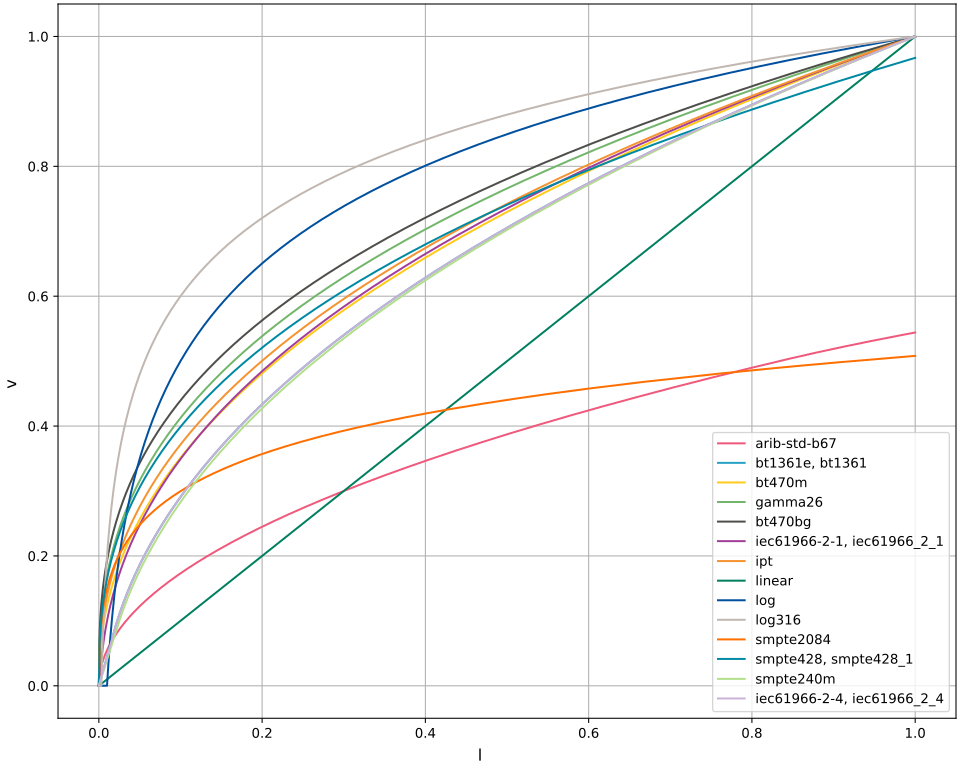
Visualize transfer functions
Display Python code
import cutcutcodec
import matplotlib.pyplot as plt
import torch
from mendevi.cst.plot import COLORS, FIGSIZE

# get curves
l2v_names: dict = {}
for name, (l2v, _) in cutcutcodec.core.colorspace.cst.TRC.items():
    l2v_names[l2v] = l2v_names.get(l2v, [])
    l2v_names[l2v].append(name)

# matplotlib plot chart
fig = plt.figure(layout="constrained", figsize=FIGSIZE)
axe = fig.subplots()
axe.grid()
fig.supylabel("v")
fig.supxlabel("l")

# plot data
l = torch.linspace(0, 1, 1000)
for i, (l2v, names) in enumerate(l2v_names.items()):
    axe.plot(l, cutcutcodec.Lambdify(l2v)(l), label=min(names), color=COLORS[i])

axe.legend()
plt.savefig("transfer.svg", format="svg")
plt.show()
Color histogram of the source video
This code allows you to view the total number of colours present in the source video. More specifically, it displays the contribution of the red, blue and green components in the non-linear color space matching the fhd profile (standard rgb).
Display Python code
import fractions
import cutcutcodec
import matplotlib.pyplot as plt
import torch
from mendevi.cst.plot import FIGSIZE

# get histogram
bins = 256
hist = [torch.zeros(bins) for _ in range(3)]
with cutcutcodec.read("park_joy.mkv") as container:
    stream = container.out_select("video")[0]
    stream = stream.apply_video_colorspace(cutcutcodec.Colorspace("r'g'b'", "srgb", "srgb"))
    for frame in cutcutcodec.core.io.scheduler.video_frames_async(
        stream,
        cutcutcodec.core.analysis.stream.optimal_rate_video(stream),
        fractions.Fraction(0),
        cutcutcodec.core.analysis.stream.optimal_shape_video(stream),
    ):
        hist = [h + torch.histc(frame[:, :, i], bins, 0, 1) for i, h in enumerate(hist)]

# plot data
fig = plt.figure(layout="constrained", figsize=FIGSIZE)
axe = fig.subplots()
axe.grid()
fig.supylabel("number of pixels of this color")
fig.supxlabel("component value")
anchors = torch.linspace(0, 1-1/bins, bins)
axe.bar(anchors, hist[0], width=1/bins, align="edge", color="#ff0000")
axe.bar(anchors, hist[1], width=1/bins, align="edge", color="#00ff00")
axe.bar(anchors, hist[2], width=1/bins, align="edge", color="#0000ff")
axe.bar(anchors, torch.minimum(hist[0], hist[1]), width=1/bins, align="edge", color="#ffff00")
axe.bar(anchors, torch.minimum(hist[0], hist[2]), width=1/bins, align="edge", color="#ff00ff")
axe.bar(anchors, torch.minimum(hist[1], hist[2]), width=1/bins, align="edge", color="#00ffff")
axe.bar(anchors, torch.minimum(torch.minimum(hist[0], hist[1]), hist[2]), width=1/bins, align="edge", color="#ffffff")
plt.savefig("rgb_histogram.svg", format="svg")
plt.show()

Reproduce
for prim in bt601 bt709 bt2020; do
    for trans in linear bt470m gamma22 gamma28 smpte2084; do
        mendevi prepare park_joy.mkv -p sd --primaries $prim --transfer $trans --range tv
        mendevi prepare park_joy.mkv -p sd --primaries $prim --transfer $trans --range pc
        mendevi prepare park_joy.mkv -p fhd --primaries $prim --transfer $trans --range tv
        mendevi prepare park_joy.mkv -p fhd --primaries $prim --transfer $trans --range pc
    done
done
mendevi encode -c libsvtav1 -c libx264 -c libx265 -c libvvenc -e fast -e medium reference*
mendevi probe --ref reference_park_joy_fhd.mp4 reference* sample*