Multithread Dataset
It allows to perform an “experimental analysis of the impact of multi-threading on video encoding energy consumption”.
Download
mendevi download multithread.db.xz.torrent
multithread.json.xz (1.2 Mo).
multithread.db.xz.torrent (5.8 Go).
Plots
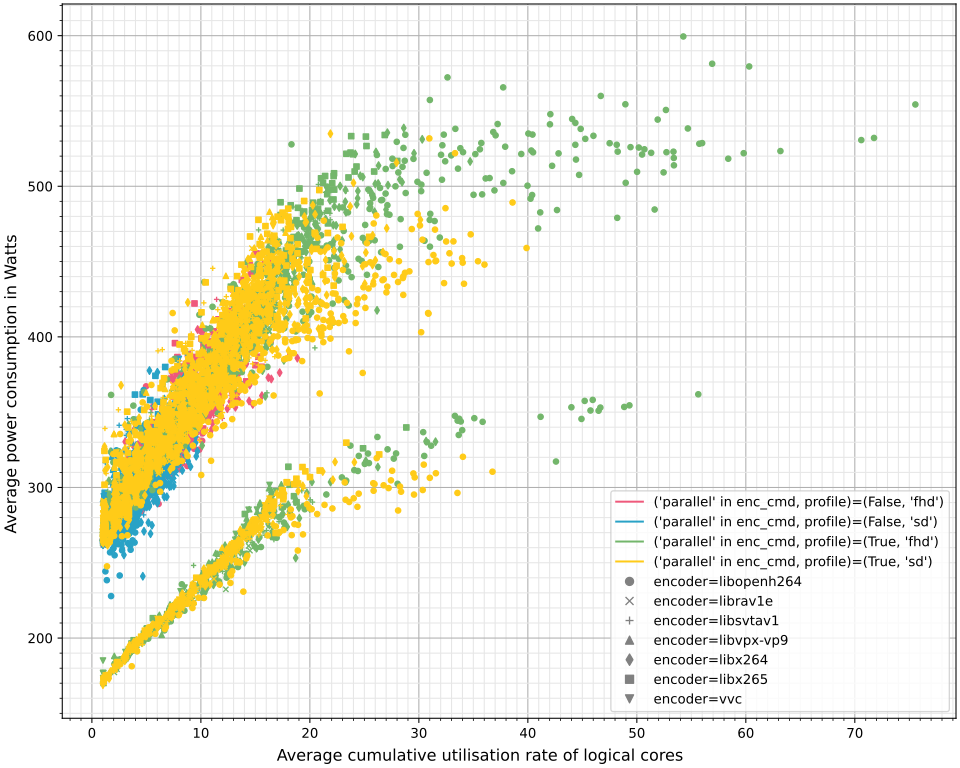
Power as a function of the logical core usage
mendevi plot multithread.db -x cores -y power -c "('parallel' in enc_cmd, profile)" -m encoder -e enc_scenario -s err=.err err=None
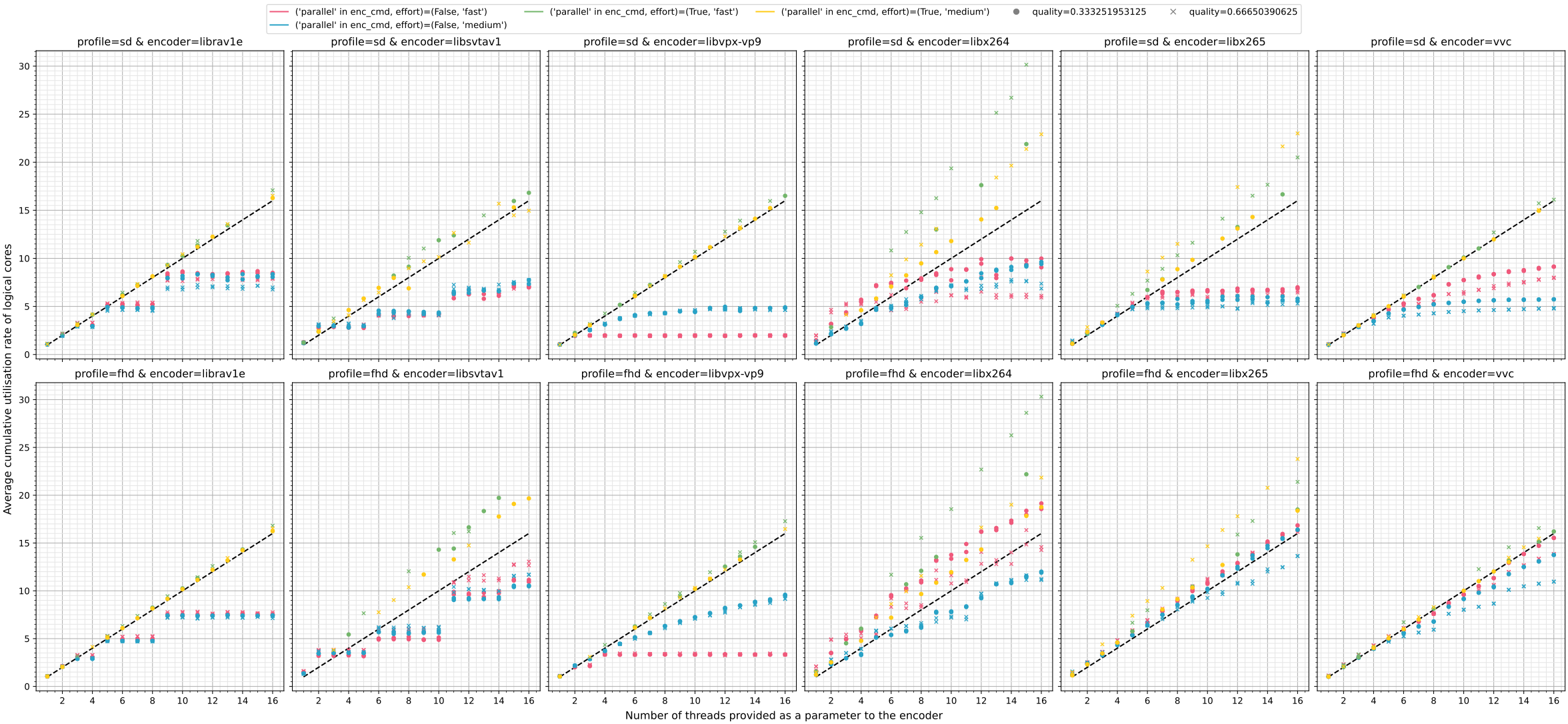
Logical core usage as a function of the provided number of threads
mendevi plot multithread.db \
    -x threads -y cores -wx encoder -wy profile \
    -c "('parallel' in enc_cmd, effort)" -m quality \
    -f "ref_stem=='park_joy'" \
    -s "(# create legend(.|\n)*?\n\n)" '\1    axe.plot([1, 16], [1, 16], "--", color="black", label="identity")\n' \
    -s "sharey=.*," 'sharey="all",' \
    -s "set_title\(.*\)" 'set_title(f"{window_y_value} {window_x_value}")'
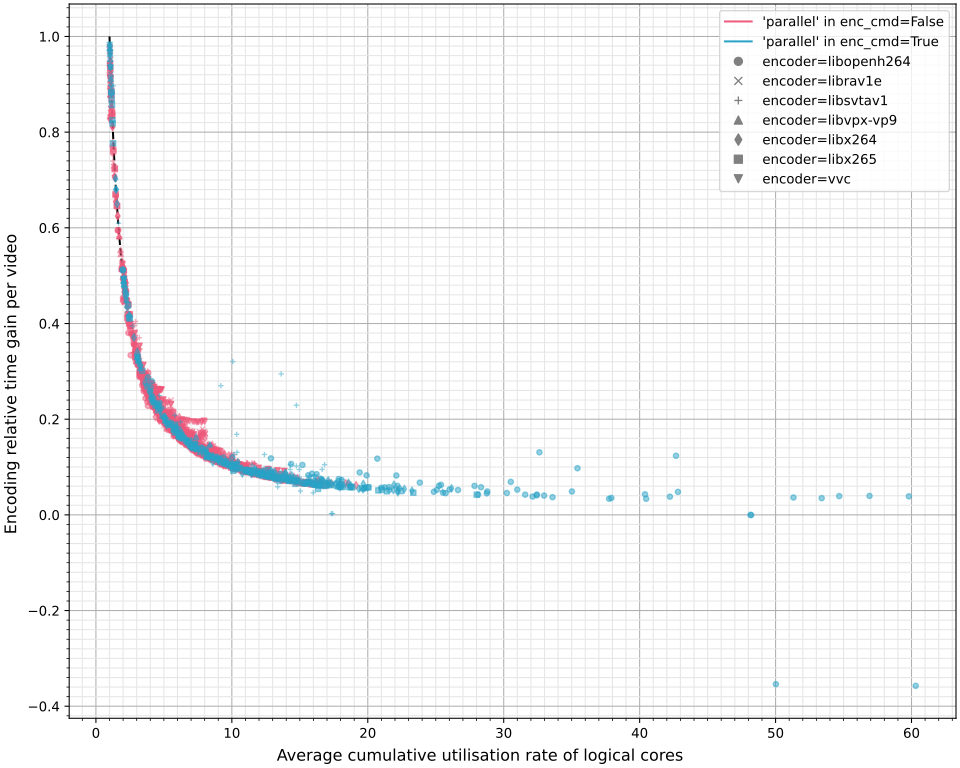
Relative energy as a function of the logical core usage
The figure cannot be generated directly. You must first create a template, which you can then modify.
mendevi plot multithread.db \
    -x cores -y act_duration -c "'parallel' in enc_cmd" -m encoder \
    -e "(ref_stem, effort, profile, quality, hostname)" \
    -s "supylabel\(.*\)" 'supylabel("Encoding relative time gain per video")' \
    -s "(# create legend(.|\n)*?\n\n)" \
       '\1    cpu = np.linspace(1, 16, 100)\n    axe.plot(cpu, 1.0/cpu, "--", color="black", label="$\\frac{1}{c}$")\n'
Then edit the function fill_axe of the just generated act_duration_as_a_function_of_cores.py file.
To do this, replace all lines in the function after yerr = [yerr[e] for e in errs] with the following code:
for x_data, y_data in zip(xerr, yerr):
    if len(x_data) < 3:
        continue
    if color_label:  # 1 thread, n videos (regression y = a*x + t0)
        eff, t0 = np.polyfit(x_data, y_data, 1)
        y_data = [y/((t0+eff)*x) for x, y in zip(x_data, y_data)]
    else:  # n threads, 1 video (regression y = t1/x)
        t1 = sum(y/x for x, y in zip(x_data, y_data)) / sum(x**-2 for x in x_data)
        y_data = [y/t1 for y in y_data]
    axe.errorbar(
        x_data,
        y_data,
        color=color,
        alpha=0.5,
        fmt=marker,
        capsize=3,
        markersize=MARKERSIZE,
    )
Finally, simply run python act_duration_as_a_function_of_cores.py to generate the final figure.
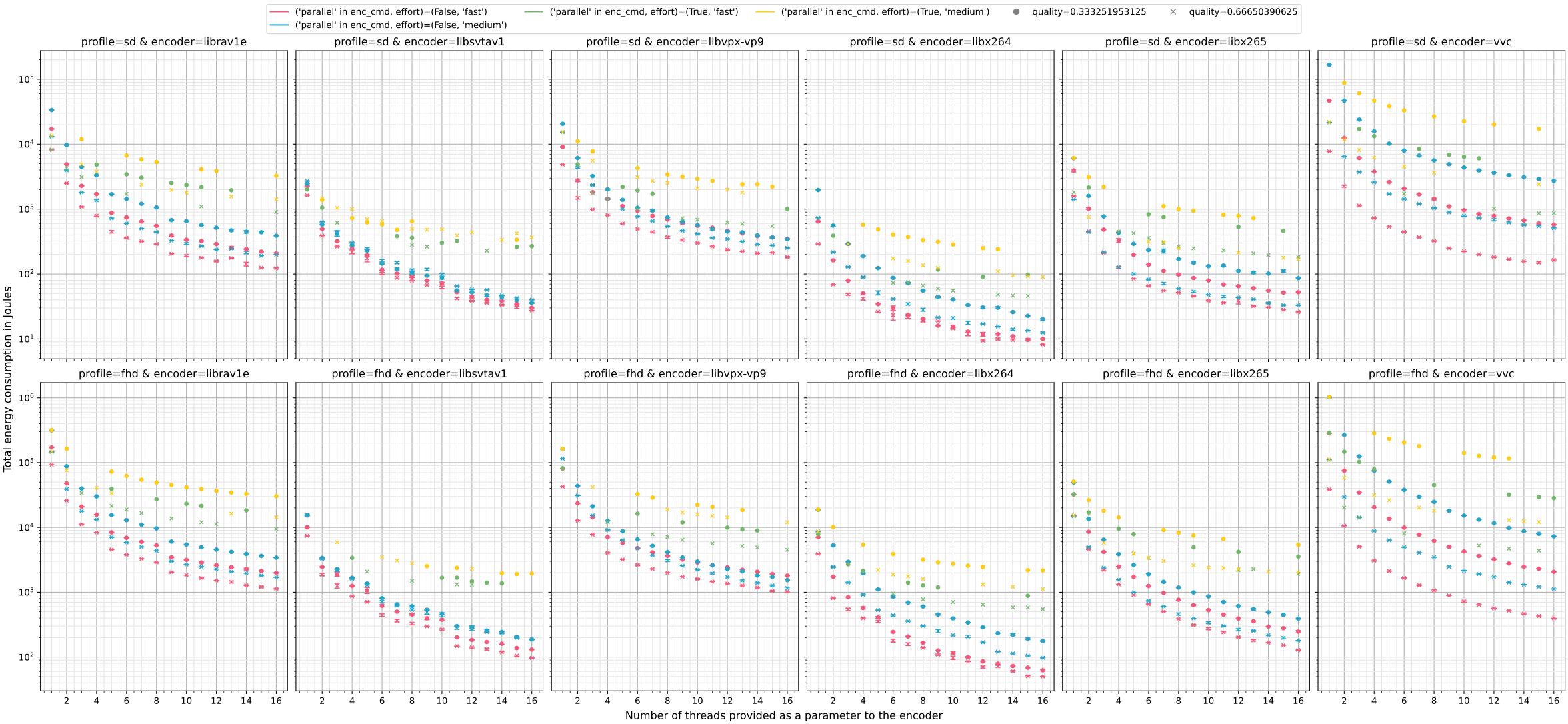
Final energy as a function of the provided number of threads
mendevi plot multithread.db \
    -x threads -y energy -wx encoder -wy profile \
    -c "('parallel' in enc_cmd, effort)" -m quality \
    -e '(threads, name)' \
    -f "ref_stem=='park_joy'" \
    -s "(x_data, \w+ = [\w\[\]]+, sub_values\[ylab\]\n)" \
       '\1        if color[0]:  # case 1 thread, n videos\n            y_data = [y/x for x, y in zip(x_data, y_data)]'
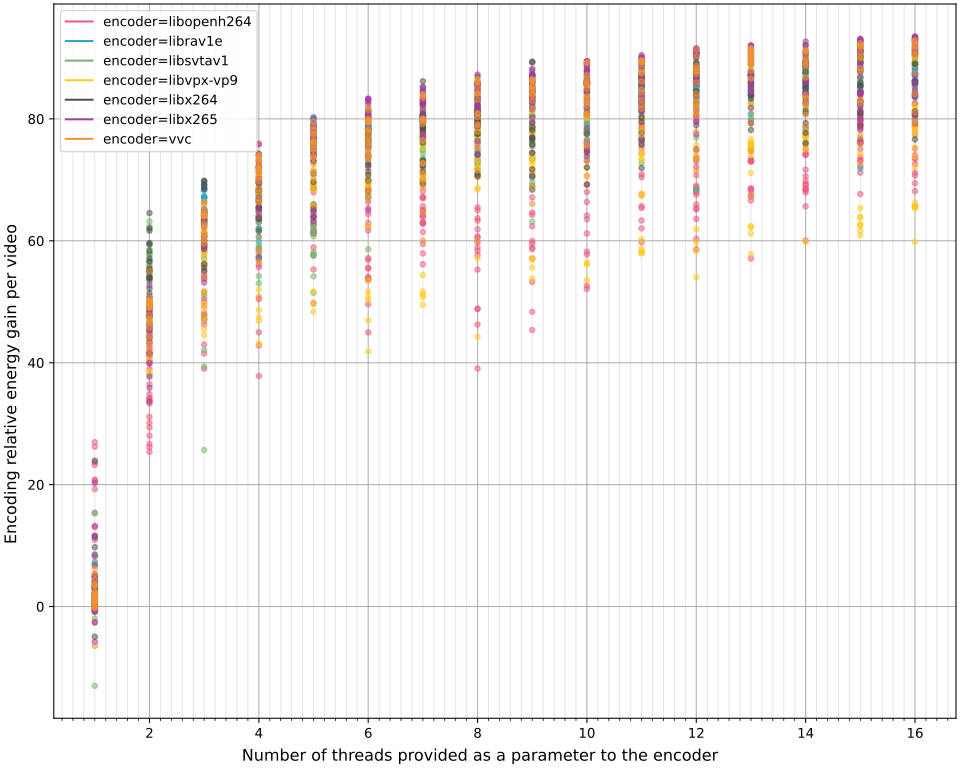
Relative gain in encoding videos simultaneously on a single thread, rather than encoding them sequentially on multiple threads
The figure cannot be generated directly. You must first create a template, which you can then modify.
mendevi plot multithread.db \
    -x threads -y energy -c encoder \
    -e "'parallel' in enc_cmd" -m "(threads, ref_stem, effort, profile, quality, hostname)" \
    -s "supylabel\(.*\)" 'supylabel("Encoding relative energy gain per video")' \
    -s "for marker(.|\n)+?\)\n" ""
Then edit the function fill_axe of the just generated energy_as_a_function_of_threads.py file.
To do this, replace all lines in the function after x_data, y_data = sub_values[xlab], sub_values[ylab] with the following code:
energy_1 = [y for y, e in zip(y_data, sub_values["error"], strict=True) if e]
energy_2 = [y for y, e in zip(y_data, sub_values["error"], strict=True) if not e]
if not (energy_1 and energy_2):
    continue
energy_1, energy_2 = np.mean(energy_1), np.mean(energy_2)
gain = 100.0 * (energy_1 - energy_2) / energy_1
axe.errorbar(
    [x_data[0]],
    [gain],
    color=color,
    alpha=0.5,
    fmt=MARKERS[0],
    capsize=3,
    markersize=MARKERSIZE,
)
Finally, simply run python energy_as_a_function_of_threads.py to generate the final figure.
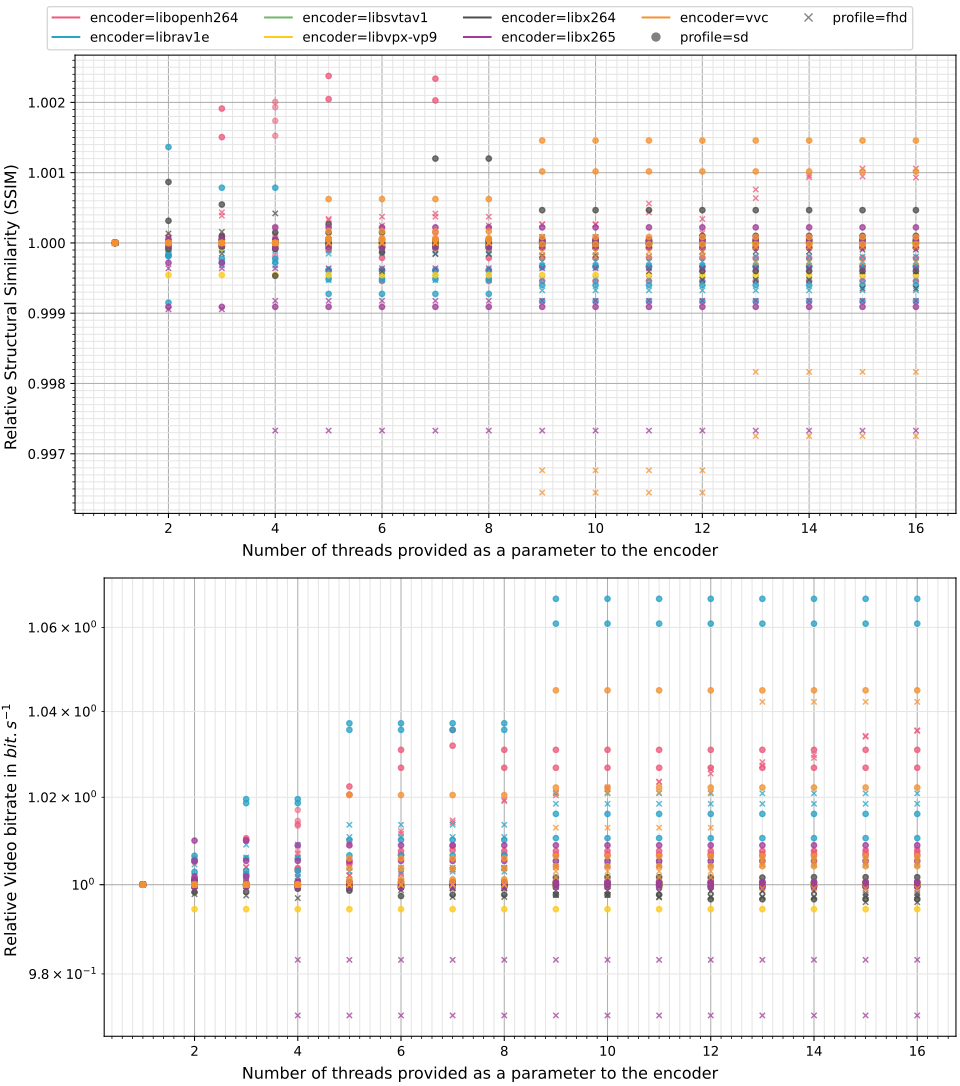
Impact of multithreading on distortion
The figure cannot be generated directly. You must first create a template, which you can then modify.
mendevi plot multithread.db \
    -x threads -y ssim -y rate -c encoder -m profile \
    -f "'parallel' not in enc_cmd" \
    -e "(ref_stem, effort, profile, quality, hostname)" \
    -s 'supylabel\("' 'supylabel("Relative '
Then edit the function fill_axe of the just generated psnr_rate_as_a_function_of_threads.py file.
To do this, replace all lines in the function after yerr = [yerr[e] for e in errs] with the following code:
for x_data, y_data in zip(xerr, yerr):
    if 1 not in x_data:
        continue
    ref = y_data[x_data.index(1)]
    y_data = [y/ref for y in y_data]
    axe.errorbar(
        x_data,
        y_data,
        color=color,
        alpha=0.5,
        fmt=marker,
        capsize=3,
        markersize=MARKERSIZE,
    )
Conclusion
The more cores used, the faster the encoding, and therefore the less significant the static power consumption. The gain is therefore very high for a small number of threads. However, this gain becomes less significant when exceeding 8 threads. In addition, bit rate distortion decreases with the number of threads due to tiling. Thus, 8 threads seems optimal.
Reproduce
Create the file callback.py with the following content:
"""Helper for mendevi multithread database."""

import pathlib
import shlex

from mendevi.cmd import CmdFFMPEG
from mendevi.encode import get_transcode_cmd


def n_threads_to_multiple_encodings(cmd: CmdFFMPEG, **kwargs) -> str:
    """Transform a single encoding on n threads, to n encoding on 1 thread."""
    # change the command for a single thread encoding
    src, dst = cmd.video, pathlib.Path(cmd.output[0])  # input / output video file
    loop = kwargs.pop("threads")  # number parallel encoding
    cmd = get_transcode_cmd(src, dst, **kwargs, threads=1)

    # duplicate the command n times, with different output
    for file in dst.parent.iterdir():
        if file.stem.startswith("bis_"):
            file.unlink()
    cmds = [cmd]
    for i in range(1, loop):
        new_cmd = cmd.copy()
        new_cmd.output = [str((dst.parent / f"bis_{i}").with_suffix(dst.suffix))]
        cmds.append(new_cmd)

    # merge together
    return f"parallel -j{loop} ::: {' '.join(shlex.quote(str(c)) for c in cmds)}"
It requires the linux tool sudo apt install parallel.
Then in a terminal, run:
for video in ctc/*.mkv; do
    mendevi prepare $video -p sd
    mendevi prepare $video -p fhd
done

mendevi encode -n2 -e fast -e medium -c libopenh264 -c librav1e -c libsvtav1 -c libvpx-vp9 -c libx264 -c libx265 -c vvc -t1 -t2 -t3 -t4 -t5 -t6 -t7 -t8 -t9 -t10 -t11 -t12 -t13 -t14 -t15 -t16 -d n_thread_1_vid.db reference*
mendevi encode -n2 -e fast -e medium -c libopenh264 -c librav1e -c libsvtav1 -c libvpx-vp9 -c libx264 -c libx265 -c vvc -t1 -t2 -t3 -t4 -t5 -t6 -t7 -t8 -t9 -t10 -t11 -t12 -t13 -t14 -t15 -t16 --callback callback.py -d 1_thread_n_vid.db reference*
mendevi merge n_thread_1_vid.db 1_thread_n_vid.db && mv merge_n_thread_1_vid_1_thread_n_vid.db multithread.db

mendevi probe -d multithread.db reference* sample*