SQL Database Content
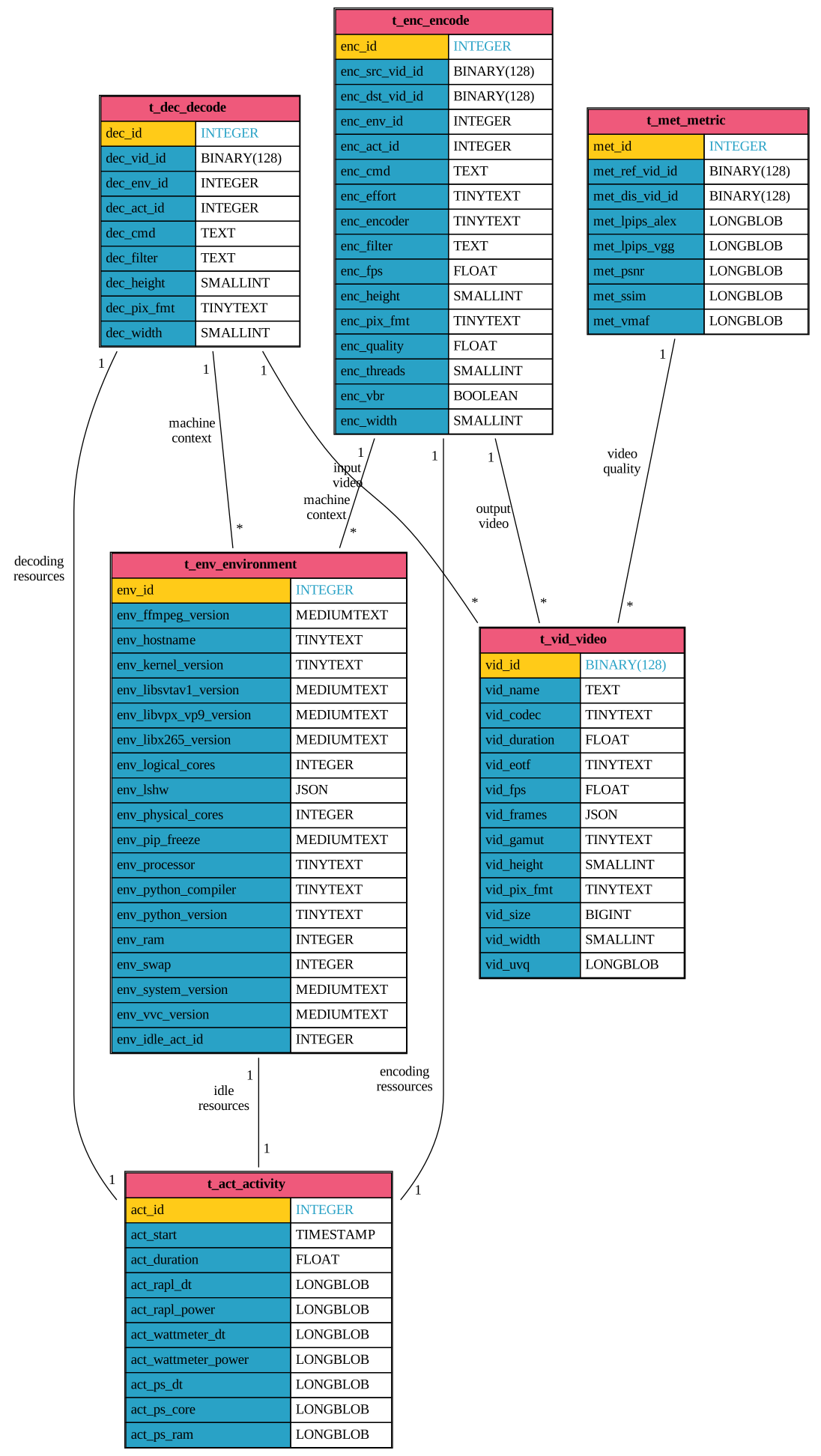
For a more detailed analysis of constraints and relationships, see the contents of the function https://mendevi.readthedocs.io/latest/_modules/mendevi/database/create.html#create_database.
Table t_act_activity
INTEGER |
key |
|
TIMESTAMP |
date when measures start |
|
FLOAT |
duration of measures |
|
LONGBLOB |
RAPL measures intervals |
|
LONGBLOB |
RAPL power values |
|
LONGBLOB |
wattmeter measures intervals |
|
LONGBLOB |
wattmeter power values |
|
LONGBLOB |
time intervals for ps |
|
LONGBLOB |
core usage values |
|
LONGBLOB |
RAM usage values |
Captures machine activity over a period of time.
act_id
Unique primary key, with no particular meaning.
act_start
The date when the measure starts, the number of second from the 1st january 1970 at 00:00:00 UTC.
act_duration
The duration of the measurement in seconds.
act_rapl_dt
The list of time intervals in seconds between two consecutive rapl measures. To deserialize into an exploitable numpy array, please use the function binary_to_list.
act_rapl_power
List of average power measurement in w with the wattmeter directly integrated into the processor power/energy-pkg/. To deserialize into an exploitable numpy array, please use the function binary_to_list.
Important
The perf library must be installed. Refer the perf guide.
Note
To access all information, the programme may require root privileges.
Or you must give the permission with sudo sysctl -w kernel.perf_event_paranoid=0,
otherwise, the sensor is not reachable.
act_wattmeter_dt
The list of time intervals in seconds between two consecutive wattmeter measures. To deserialize into an exploitable numpy array, please use the function binary_to_list.
Tip
Only available for the measures taken on grid’5000.
act_wattmeter_power
The sampled external wattmeter measurement in w. To deserialize into an exploitable numpy array, please use the function binary_to_list.
Tip
Only available for the measures taken on grid’5000.
act_ps_dt
The list of the duration of each measurement point (in second). To deserialize into an exploitable numpy array, please use the function binary_to_list.
act_ps_core
The percent usage of each logical core average activity for each interval. To deserialize into an exploitable numpy array, please use the function binary_to_tensor.
act_ps_ram
The sampled total usage of ram in bytes. To deserialize into an exploitable numpy array, please use the function binary_to_list.
Table t_vid_video
BINARY(128) |
the video key |
|
TEXT |
the basename of the video file |
|
TINYTEXT |
the small codec name |
|
FLOAT |
the video duration |
|
TINYTEXT |
the color transfer name |
|
FLOAT |
the framerate |
|
JSON |
detailed content of all frames |
|
TINYTEXT |
the color primaries name |
|
SMALLINT |
video height in pixels |
|
TINYTEXT |
bit depth and subsampling name |
|
BIGINT |
file size in bytes |
|
SMALLINT |
video width in pixels |
|
LONGLONGBLOB |
UVQ metric values |
Contains the essential absolute characteristics of a video file.
vid_id
The md5 128 bits checksum of the video file. The names of transcoded videos include this signature encoded in base32.
vid_name
The base name of the video file, including the suffix:
sample_74d47vez2trcs3uupnjzclz4mm.mp4
vid_codec
The name of the video codec, catched by cutcutcodec.get_codec_video():
av1
vid_duration
The accurate video duration in second, including the display time of the last frame.
Catched by cutcutcodec.get_duration_video().
vid_eotf
The name of the Electro Optical Transfer Function present in the metadata, or the most probable one if not.
Catched by cutcutcodec.get_colorspace().transfer.
bt1361e, bt1361
vid_fps
The theorical framerate in Hz written in the file metadata.
Catched by cutcutcodec.get_rate_video(). Very often, the exact value is a fraction with a denominator limited to 1001.
vid_frames
The list containing all the metadata for each frame.
[
    {
        "best_effort_timestamp": "0",
        "best_effort_timestamp_time": "0.000000",
        "chroma_location": "unspecified",
        "color_primaries": "smpte170m",
        "color_range": "tv",
        "color_space": "smpte170m",
        "color_transfer": "bt709",
        "crop_bottom": "0",
        "crop_left": "0",
        "crop_right": "0",
        "crop_top": "0",
        "duration": "1001",
        "duration_time": "0.041708",
        "height": "480",
        "interlaced_frame": "0",
        "key_frame": "1",
        "lossless": "0",
        "media_type": "video",
        "pict_type": "I",
        "pix_fmt": "yuv420p",
        "pkt_dts": "0",
        "pkt_dts_time": "0.000000",
        "pkt_pos": "48",
        "pkt_size": "147504",
        "pts": "0",
        "pts_time": "0.000000",
        "repeat_pict": "0",
        "sample_aspect_ratio": "1:1",
        "stream_index": "0",
        "top_field_first": "0",
        "width": "720"
    },
    ...
]
vid_gamut
The name of the colorspace primaries present in the metadata, or the most probable one if not.
Catched by cutcutcodec.get_colorspace().primaries.
ntsc
vid_height
The height of the video in pixels, after being decoded.
vid_pix_fmt
The canonical name of the pixel format, carrying information about the colour space used (yuv or rgb), subsampling (444, 420 or 422) and bit depth (8, 10 or 12).
Catched by cutcutcodec.get_pix_fmt().
yuv420p
vid_size
The total size in bytes of the video file as it appears on the disc.
vid_width
The width of the video in pixels, after being decoded.
vid_uvq
The serialised list of the non comparative Google Universale Video Quality Model metric. Catched by cutcutcodec.compare(None, video, uvq=True)["uvq"].
To deserialize into an exploitable numpy array, please use the function binary_to_list.
Table t_met_metric
INTEGER |
key |
|
BINARY(128) |
the reference video identifier |
|
BINARY(128) |
the identifier of the distorted video |
|
LONGBLOB |
values of LPIPS ALEX metric |
|
LONGBLOB |
values of LPIPS VGG metric |
|
LONGBLOB |
values of PSNR metric |
|
LONGBLOB |
values of SSIM metric |
|
LONGBLOB |
values of VMAF metric |
Compare the quality of a distorted video against a reference video using comparative metrics.
met_id
Unique primary key, with no particular meaning.
met_ref_vid_id
The never-null identifier of the reference video, as defined in vid_id.
met_dis_vid_id
The never-null identifier of the distorted video, as defined in vid_id.
met_lpips_alex
The serialised list of the LPIPS comparative metric using the ALEX neural network.
Catched by cutcutcodec.compare(ref, dis, lpips_alex=True)["lpips_alex"].
To deserialize into an exploitable numpy array, please use the function binary_to_list.
met_lpips_vgg
The serialised list of the LPIPS comparative metric using the VGG neural network.
Catched by cutcutcodec.compare(ref, dis, lpips_vgg=True)["lpips_vgg"].
To deserialize into an exploitable numpy array, please use the function binary_to_list.
met_psnr
The serialised list of the yuv peak signal to noise ratio comparative metric.
Catched by cutcutcodec.compare(ref, dis, psnr=True)["psnr"].
To deserialize into an exploitable numpy array, please use the function binary_to_list.
met_ssim
The serialised list of the yuv structural similarity index measure comparative metric.
Catched by cutcutcodec.compare(ref, dis, ssim=True)["ssim"].
To deserialize into an exploitable numpy array, please use the function binary_to_list.
met_vmaf
The serialised list of the comparative metric Netflix Video Multi-Method Assessment Fusion metric.
Catched by cutcutcodec.compare(ref, dis, vmaf=True)["vmaf"].
To deserialize into an exploitable numpy array, please use the function binary_to_list.
Important
If you want to measure this metric, the vmaf library must be installed. Refer the vamf (optional) guide.
Table t_env_environment
INTEGER |
Key |
|
MEDIUMTEXT |
the full ffmpeg version |
|
TINYTEXT |
the username |
|
TINYTEXT |
the linux kernel version |
|
MEDIUMTEXT |
the version of libsvtav1 |
|
MEDIUMTEXT |
the version of libvpx-vp9 |
|
MEDIUMTEXT |
the version of libx265 |
|
INTEGER |
the number of visible cpu |
|
JSON |
the machine config |
|
INTEGER |
the real number of cpu |
|
MEDIUMTEXT |
all python packages version |
|
TINYTEXT |
the processos familly |
|
TINYTEXT |
name of python compiler |
|
TINYTEXT |
the python version |
|
INTEGER |
Total amount of RAM |
|
INTEGER |
Total amount of SWAP |
|
MEDIUMTEXT |
the OS version |
|
MEDIUMTEXT |
the version of vvenc |
|
INTEGER |
IDLE as Table t_act_activity |
Captures the physical characteristics and configuration of a machine. This table also captures the library version of a given measurement.
env_id
Unique primary key, with no particular meaning.
env_ffmpeg_version
The ffmpeg banner containing compilation options and library versions. This is human-readable text, returned by the function get_ffmpeg_version.
Please follow the :ref`install_ffmpeg`` section.
ffmpeg version N-120220-g934e1c23b0 Copyright (c) 2000-2025 the FFmpeg developers
built with gcc 14 (Ubuntu 14.2.0-4ubuntu2)
configuration: --prefix=/home/rrichard/ffmpeg_build --pkg-config-flags=--static --extra-cflags=-I/home/rrichard/ffmpeg_build/include --extra-ldflags=-L/home/rrichard/ffmpeg_build/lib --extra-libs='-lpthread -lm' --ld=g++ --bindir=/home/rrichard/bin --enable-gpl --enable-gnutls --enable-libaom --enable-libass --enable-libfdk-aac --enable-libfreetype --enable-libmp3lame --enable-libopus --enable-libsvtav1 --enable-libdav1d --enable-libvorbis --enable-libvpx --enable-libx264 --enable-libx265 --enable-libvvenc --enable-nonfree
libavutil      60.  4.101 / 60.  4.101
libavcodec     62.  6.100 / 62.  6.100
libavformat    62.  1.101 / 62.  1.101
libavdevice    62.  0.100 / 62.  0.100
libavfilter    11.  1.100 / 11.  1.100
libswscale      9.  0.100 /  9.  0.100
libswresample   6.  0.100 /  6.  0.100
env_hostname
The username, given by platform.node(), from the function get_platform.
PTB-5CG4414JJD
env_kernel_version
The version of the Linux kernel, given by platform.platform(), from the function get_platform.
Linux-6.11.0-29-generic-x86_64-with-glibc2.40
env_libsvtav1_version
The version of the libsvtav1 encoder and the version of the compiler for this library. It comes from the function get_libsvtav1_version.
v3.0.2-103-gc10214fa
GCC 14.2.0 64 bit
env_libvpx_vp9_version
The version of the libvpx-vp9 encoder. It comes from the function get_libvpx_vp9_version.
v1.14.1
env_libx265_version
The version of the libx265 encoder and the version of the compiler for this library. It comes from the function get_libx265_version.
4.1+188-cd4f0d6e9
[Linux][GCC 14.2.0][64 bit] 8bit+10bit+12bit
MMX2 SSE2Fast LZCNT SSSE3 SSE4.2 AVX FMA3 BMI2 AVX2
env_logical_cores
The number of logical (threaded) cores, in general more than the number of physical cores. It is given by psutil.cpu_count(logical=True), from the function get_platform.
env_lshw
A wealth of information on machine components, processor architecture, etc.
Important
The lshw library must be installed. Refer the lshw guide.
Note
To access all information, the programme must have root privileges. Otherwise, some of the information will be missing.
{
    "id": "ptb-5cg4414jjd",
    "class": "system",
    "claimed": true,
    "description": "Computer",
    "width": 64,
    "capabilities": {
        "smp" : "Symmetric Multi-Processing",
        "vsyscall32" : "processus 32 bits"
    },
    "children" : [
        {
            "id": "core",
            "class": "bus",
            "claimed": true,
            "description": "Motherboard",
            "physid": "0",
            "children": ...
        },
        {
            "id" : "cpu",
            "class" : "processor",
            ...
            "configuration" : {
                "microcode" : "36"
            },
            "capabilities" : {
                "fpu" : "mathematical co-processor",
                ...
                "cpufreq" : "CPU Frequency scaling"
            }
        }
    ]
}
env_physical_cores
The number of physical cores, in general less than the number of logical physical cores. It is given by psutil.cpu_count(logical=False), from the function get_platform.
env_pip_freeze
The list of the version of the python packages. The function get_pip_freeze parse the command uv pip freeze.
aiohappyeyeballs==2.6.1
aiohttp==3.11.16
aiosignal==1.3.2
ansible-core==2.17.11
astroid==3.3.10
asttokens==3.0.0
attrs==25.3.0
av==14.3.0
bcrypt==4.3.0
black==25.1.0
cairocffi==1.7.1
CairoSVG==2.7.1
certifi==2025.1.31
cffi==1.17.1
charset-normalizer==3.4.1
click==8.1.8
colorama==0.4.6
...
env_processor
The proccessor familly, given by platform.processor(), from the function get_platform.
x86_64
env_python_compiler
The cython compiler and version, given by platform.python_compiler(), from the function get_platform.
GCC 14.2.0
env_python_version
The version of python, given by platform.python_version(), from the function get_platform.
3.13.2
env_ram
The total physical memory (exclusive swap) in bytes, given by psutil.virtual_memory().total, from the function get_platform.
env_swap
The total swap memory in bytes, given by psutil.swap_memory().total, from the function get_platform.
env_system_version
The name and the version of linux, given by platform.version(),from the function get_platform.
#29-Ubuntu SMP PREEMPT_DYNAMIC Fri Jun 13 20:29:41 UTC 2025
env_vvc_version
The version of the vvenc encoder. It comes from the function get_vvc_version.
1.13.1
env_idle_act_id
The id in the table Table t_act_activity of the IDLE measure of the machine.
Table t_dec_decode
INTEGER |
Key |
|
BINARY(128) |
the reference video identifier |
|
INTEGER |
the environment identifier |
|
INTEGER |
the activity identifier |
|
TEXT |
ffmpeg command used |
|
TEXT |
additional video filter |
|
SMALLINT |
decoded height |
|
TINYTEXT |
decoded pixel format |
|
SMALLINT |
decoded width |
Contains the informations about video decoding.
dec_id
Unique primary key, with no particular meaning.
dec_vid_id
This is the reference of the source video that has been decoded. It points to the table Table t_vid_video.
dec_env_id
This is the reference of the context in which the decoding took place. It points to the table Table t_env_environment.
dec_act_id
This is a reference of measuring the machine’s activity during video decoding. It points to the table Table t_act_activity.
dec_cmd
The ffmpeg command used for decoding:
ffmpeg -threads 1 -i src.mp4 -vf format=rgb24 -f null /dev/null
dec_filter
The additional ffmpeg video filter (after the -vf command) applied during decoding.
dec_height
In order to adapt the size of the decoded images to the size of the terminal, the frames are resized on the fly. Here is the final height of the screen.
dec_pix_fmt
During decoding, the pixels are converted into another format so that they can be displayed. This is the final format.
rgb24
dec_width
In order to adapt the size of the decoded images to the size of the terminal, the frames are resized on the fly. Here is the final width of the screen.
Table t_enc_encode
INTEGER |
Key |
|
BINARY(128) |
the input video |
|
BINARY(128) |
the ouput transcoded video |
|
INTEGER |
the environment identifier |
|
INTEGER |
the activity identifier |
|
TEXT |
ffmpeg command used |
|
TINYTEXT |
the effort made by the encoder |
|
TINYTEXT |
the encoder name |
|
TEXT |
additional video filter |
|
FLOAT |
the input framerate |
|
SMALLINT |
the input frames height |
|
TINYTEXT |
the input pixel format |
|
FLOAT |
the encoding crf or qp |
|
SMALLINT |
the number of threads used |
|
BOOLEAN |
variable or constant bit rate |
|
SMALLINT |
the input frames width |
Contains the informations about video encoding.
enc_id
Unique primary key, with no particular meaning.
enc_src_vid_id
This is the reference of the input video that enters into the encoder. It points to the table Table t_vid_video.
enc_dst_vid_id
This is the reference of the transcoded video that exits the encoder. It points to the table Table t_vid_video.
enc_env_id
This is the reference of the context in which the encoding took place. It points to the table Table t_env_environment.
enc_act_id
This is a reference of measuring the machine’s activity during video encoding. It points to the table Table t_act_activity.
enc_cmd
The ffmpeg command used for encoding:
ffmpeg -y -i src.mp4 -c:v libsvtav1 -crf 15 -preset 6 -svtav1-params film-grain=0:lp=3 dst.mp4
enc_effort
The effort that the encoder puts into optimizing the bit rate distortion ratio in exchange for increased computing time.
Possible values are fast, medium and slow.
enc_encoder
The ffmpeg encoder name. Possible values are libx264, libx265, libvpx-vp9, libsvtav1 and vvc.
enc_filter
The additional ffmpeg video filter (after the -vf command) applied during decoding.
enc_fps
The frame rate in Hz of the video at the encoder input.
enc_height
The number of pixel of the frames along the height dimension.
pix_fmt
The pixel format used for encoding.
yuv420p
enc_quality
The relative quality \(\in [0, 1]\) that the encoder aims for the final video. This number is afinally related to the crf or qp parameter. 0 corresponds to near lossless encoding, and 1 to highly lossly encoding.
enc_threads
The number of threads that the encoder uses simultaneously. This is related to the CPU utilisation rate.
enc_vbr
Boolean that is true if the bit rate is variable (crf mode), or false if it is constant (qp mode).
enc_width
The number of pixel of the frames along the width dimension.